Intro
This challenge is a small C# console program protected with ILSentinel. It takes a username and a serial, checks the pair, and prints whether access was granted. The goal here is to recover a serial that the original program accepts.
Opening it in dnSpy does not give much away. The names are unreadable, the entry point fails to decompile, and the license calculation runs inside a custom virtual machine. That VM is an interpreter built into the program: it executes its own bytecode instead of exposing the calculation as ordinary C#.
The useful detail is what happens after the calculation. The program passes its expected serial into a normal .NET method, where dnSpy can inspect it. This walkthrough follows that path: let the method bodies decrypt, skip the watchdog setup, then catch the completed string in a callback. It ends by testing the recovered pair against the unmodified executable.
You can follow along with Windows, dnSpy, and the original challenge below. No recovery scripts or patched binaries are needed. The screenshots use dnSpy 6.1.8, 64-bit. Each metadata token in the walkthrough belongs to this exact build, so use the attached sample.
Download Crackme.exeDownload as ZIP
The result is a working username and serial. The flag printed afterward is still unreadable; recovering that flag and fully devirtualizing the program are outside this walkthrough.
Start with the broken Main
Open the original Crackme.exe in dnSpy on Windows. This session uses dnSpy 6.1.8, 64-bit; the challenge targets .NET Framework 4.8. If you need a copy of the debugger, use the official dnSpyEx releases.
Set the language dropdown in the toolbar to C#. Select the challenge module in Assembly Explorer, click the code panel, and press Ctrl+D. This opens Go to MD Token. Enter 0x0600008D to jump to Main.
A metadata token identifies a member without needing its name. The tokens in this post are shortcuts for this particular sample; they won't necessarily point to the same methods in a different build.
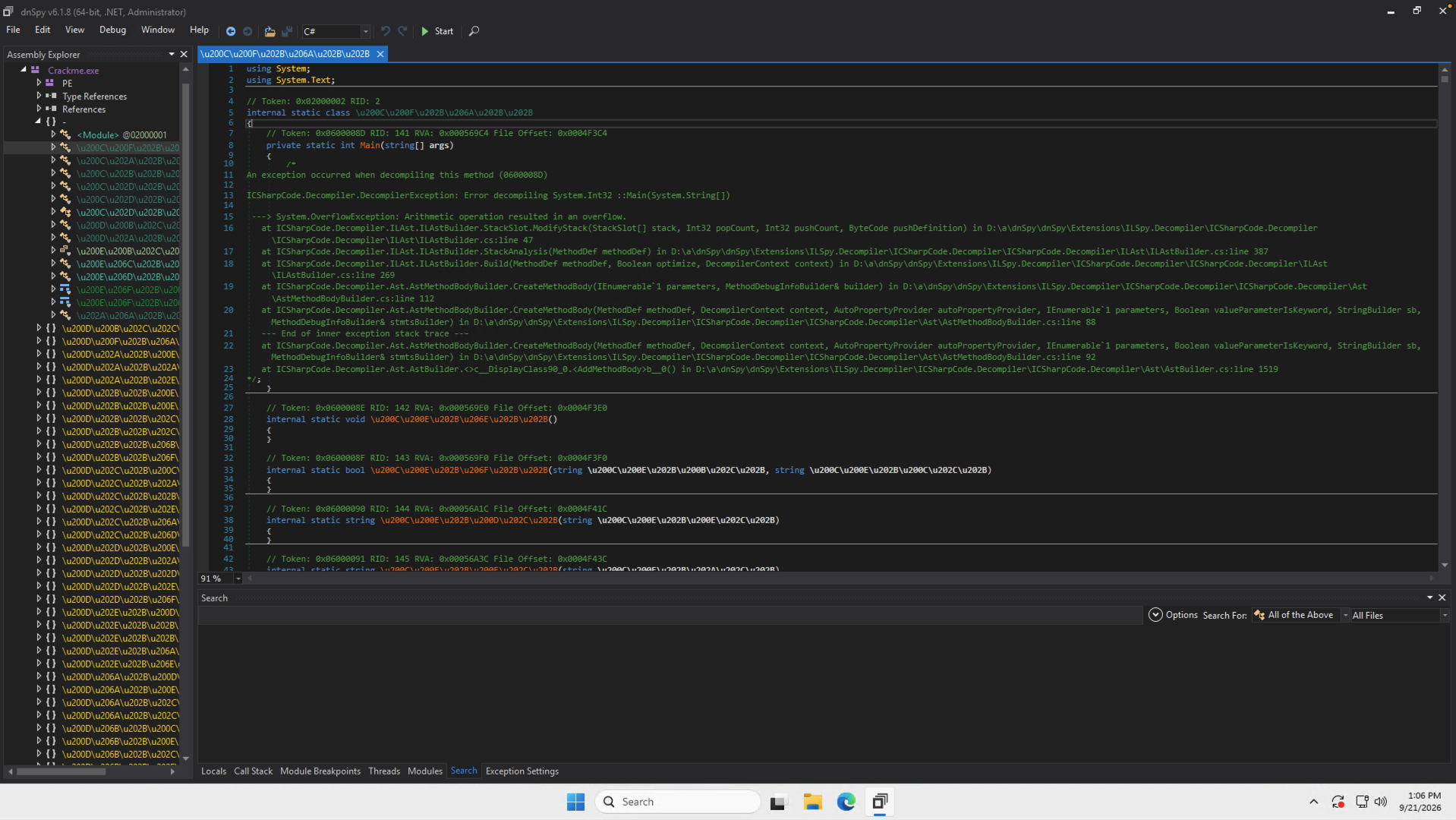
The exception is coming from the decompiler. For this sample, the bytes on disk aren't yet the valid IL that the method will execute. Let the program restore those bytes, then inspect the running copy.
Let the first startup call finish
Use Ctrl+D again, this time with 0x06000001. This is the module constructor, shown as static <Module>(). It runs before Main.
There are two calls inside it. The first performs method-body decryption. The second continues initialization. Put a breakpoint on the second call: click the statement and press F9. It's line 11 in the screenshot.
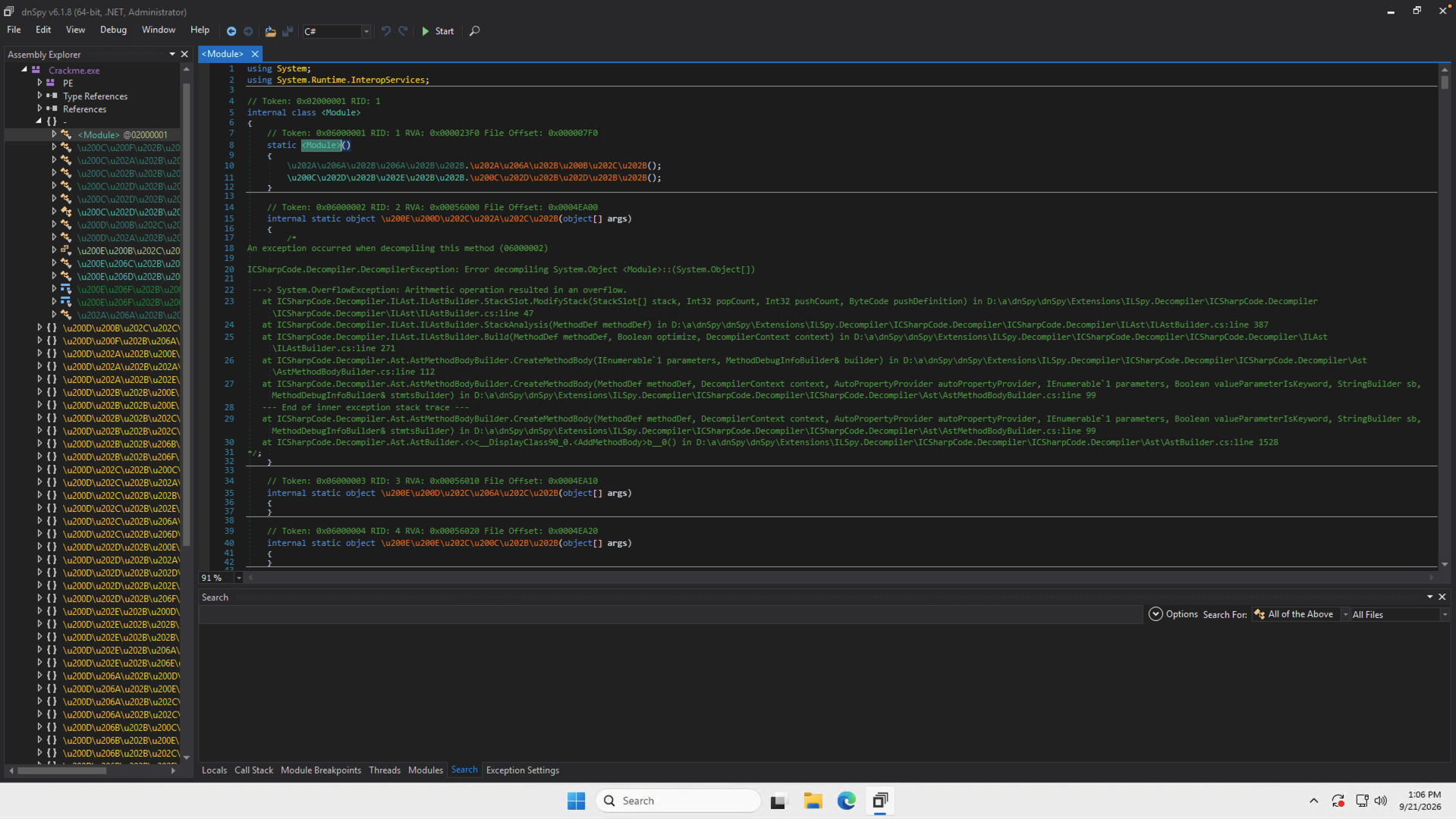
Breakpoints stop before their statement executes. This one gives the decryptor time to finish while keeping the rest of startup paused.
Press F5. In the launch dialog, choose .NET Framework and enter:
test AAAAA-AAAAA-AAAAA-AAAAAUse that full dummy serial. The checker rejects serials whose normalized length isn't 23 characters, so a short value such as 123 would never reach the code we want. The username also needs at least three characters after normalization.
Leave Break at on Don’t Break. That setting doesn't disable the breakpoint you just placed.
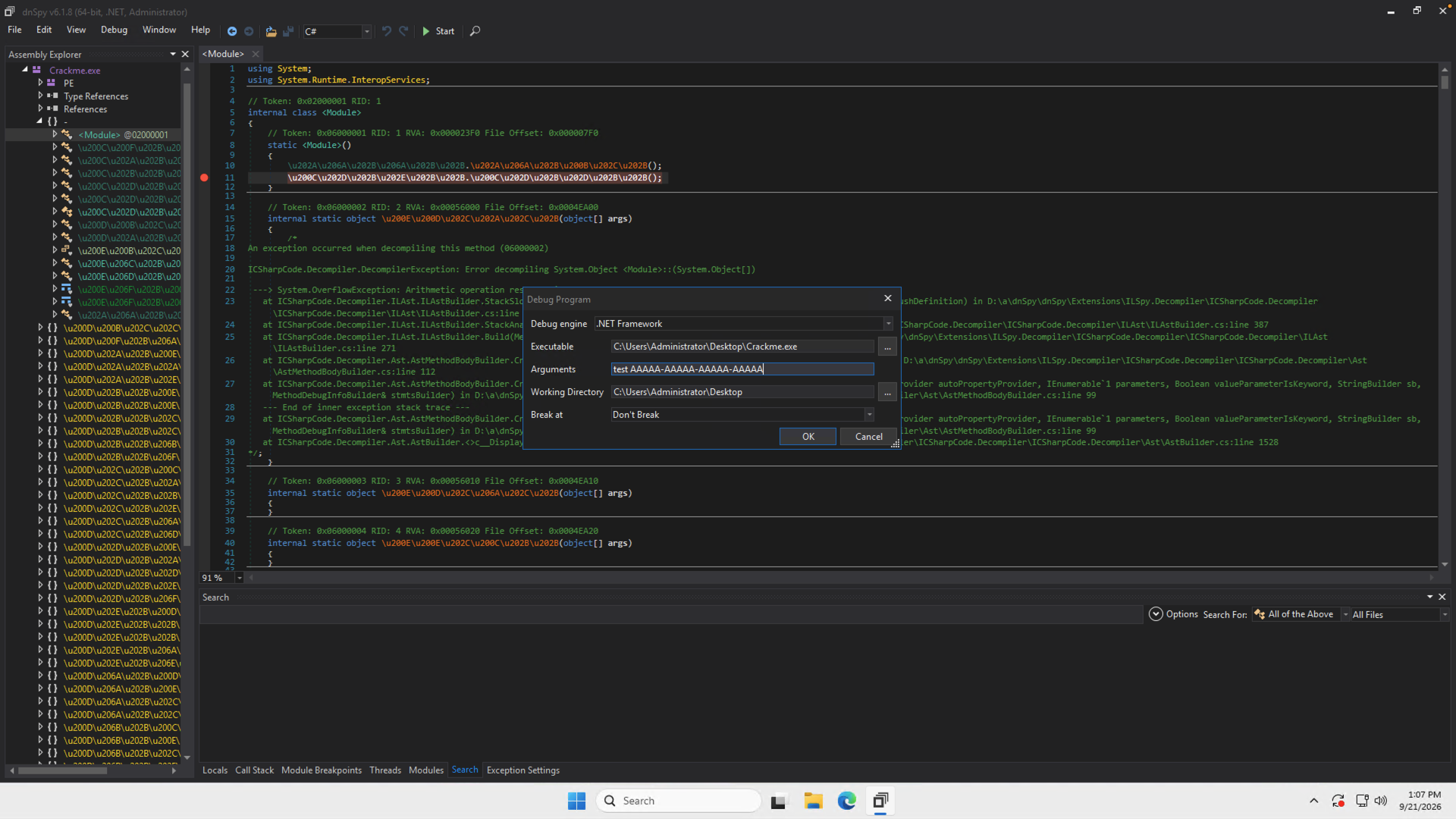
Click OK. dnSpy pauses on the second call, with the yellow execution marker beside it.
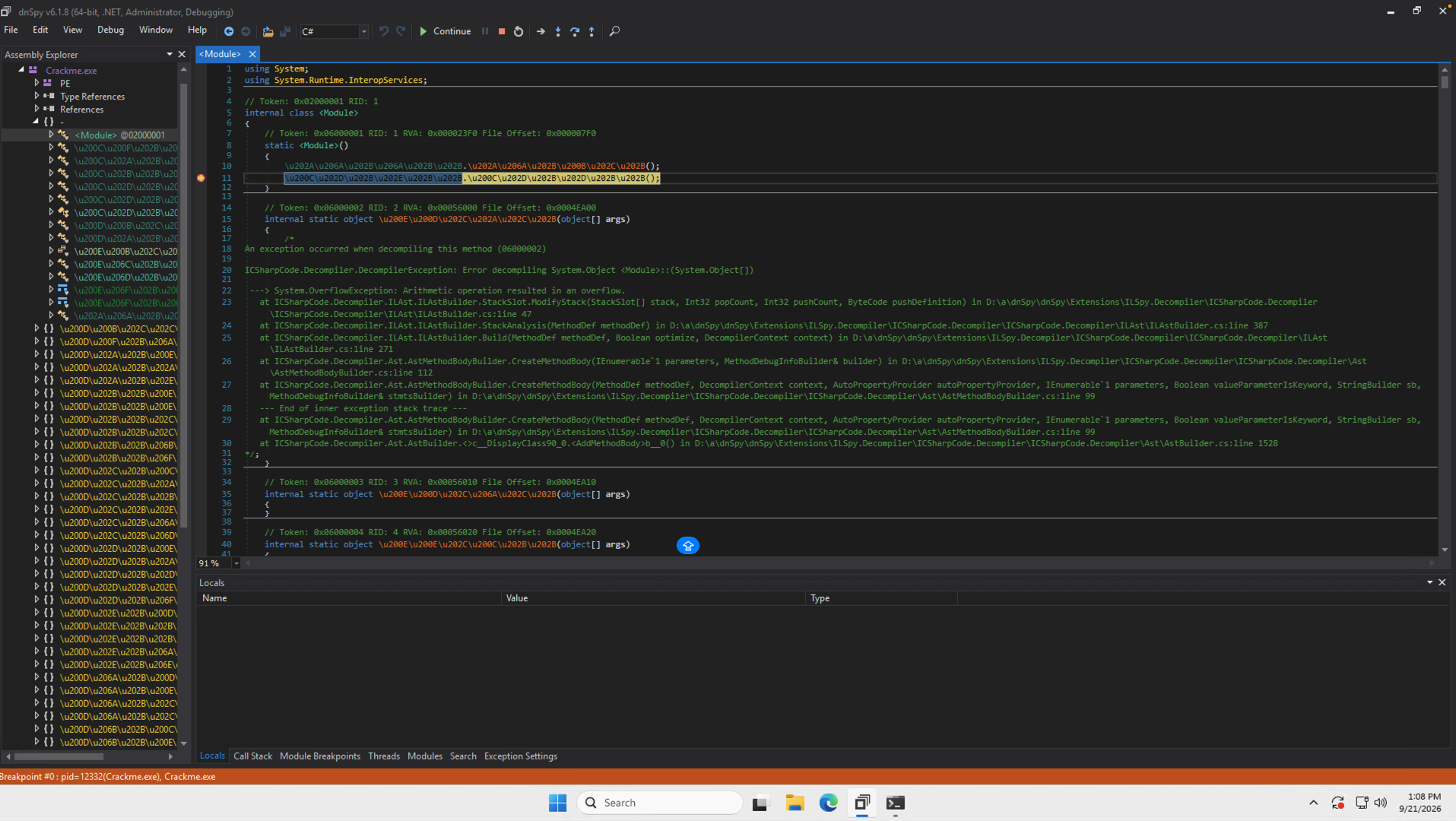
Read the copy in memory
The code panel may still show the original decompilation errors. It hasn't necessarily switched away from the disk image.
Open Debug → Windows → Modules. Find Crackme.exe, right-click it, and choose Open Module from Memory. In that newly opened module, use Ctrl+D → 0x0600008D to revisit Main.
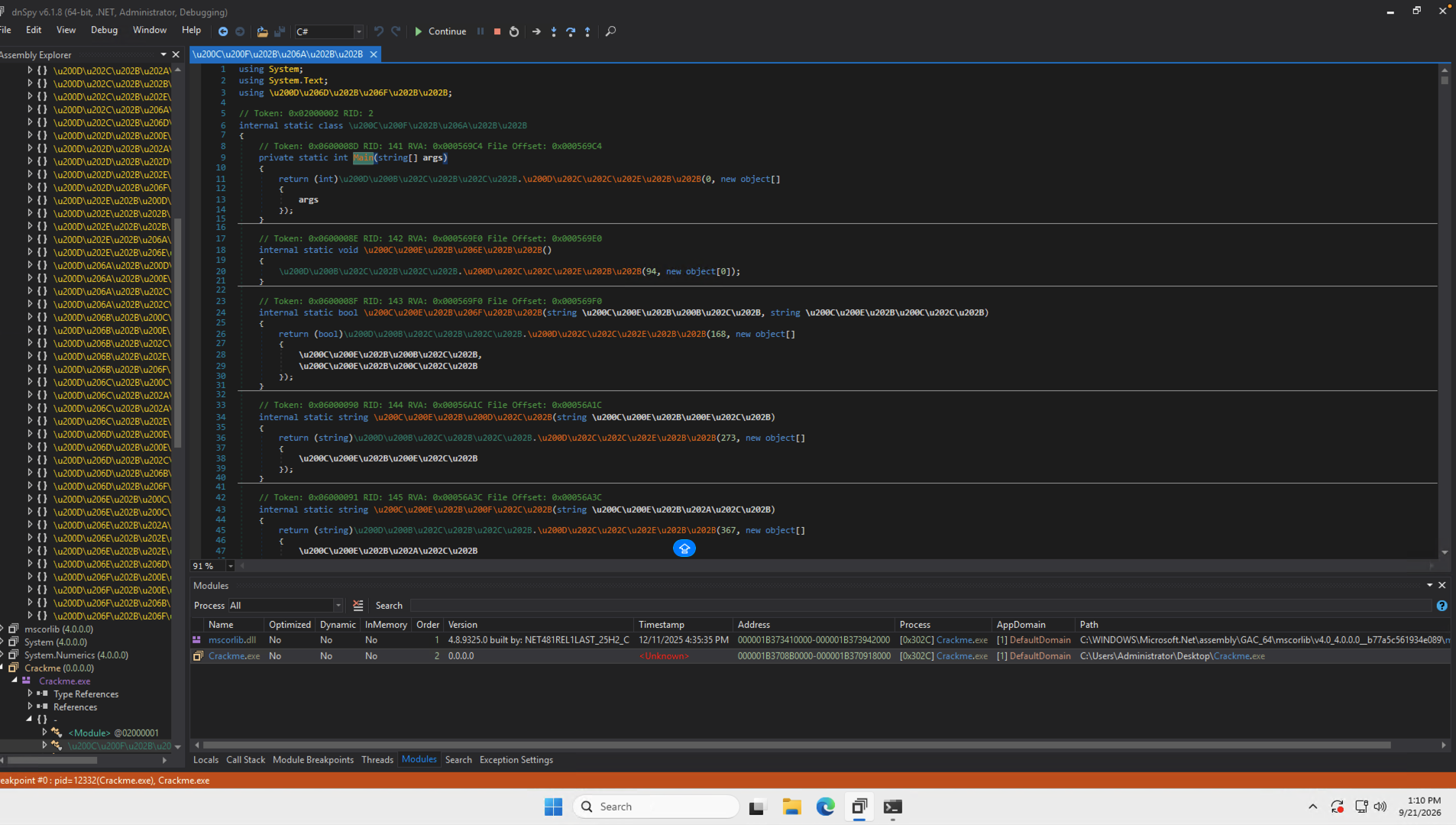
With an explanatory name substituted for the obfuscated target, the body is:
return (int)ExecuteVm(0, new object[] { args });The 0 selects the bytecode location. The array carries the command-line arguments. Nearby wrappers call the same method with offsets such as 94, 168, and 273.
So the outer encryption is out of the way, but this hasn't devirtualized anything. The next steps work by watching a value come back out of the VM.
Stay in the module opened from memory. dnSpy can keep both copies in the tree, and jumping back to the disk copy brings the broken bodies back into view.
Skip the watchdog setup
Before checking the serial, the program starts background anti-debug work. Jump to 0x060000AA, place a breakpoint on the first executable statement with F9, then continue with F5.
This stops at the beginning of the initializer. Below the current line are the thread setup and the Worker and Watchdog delegate fields.
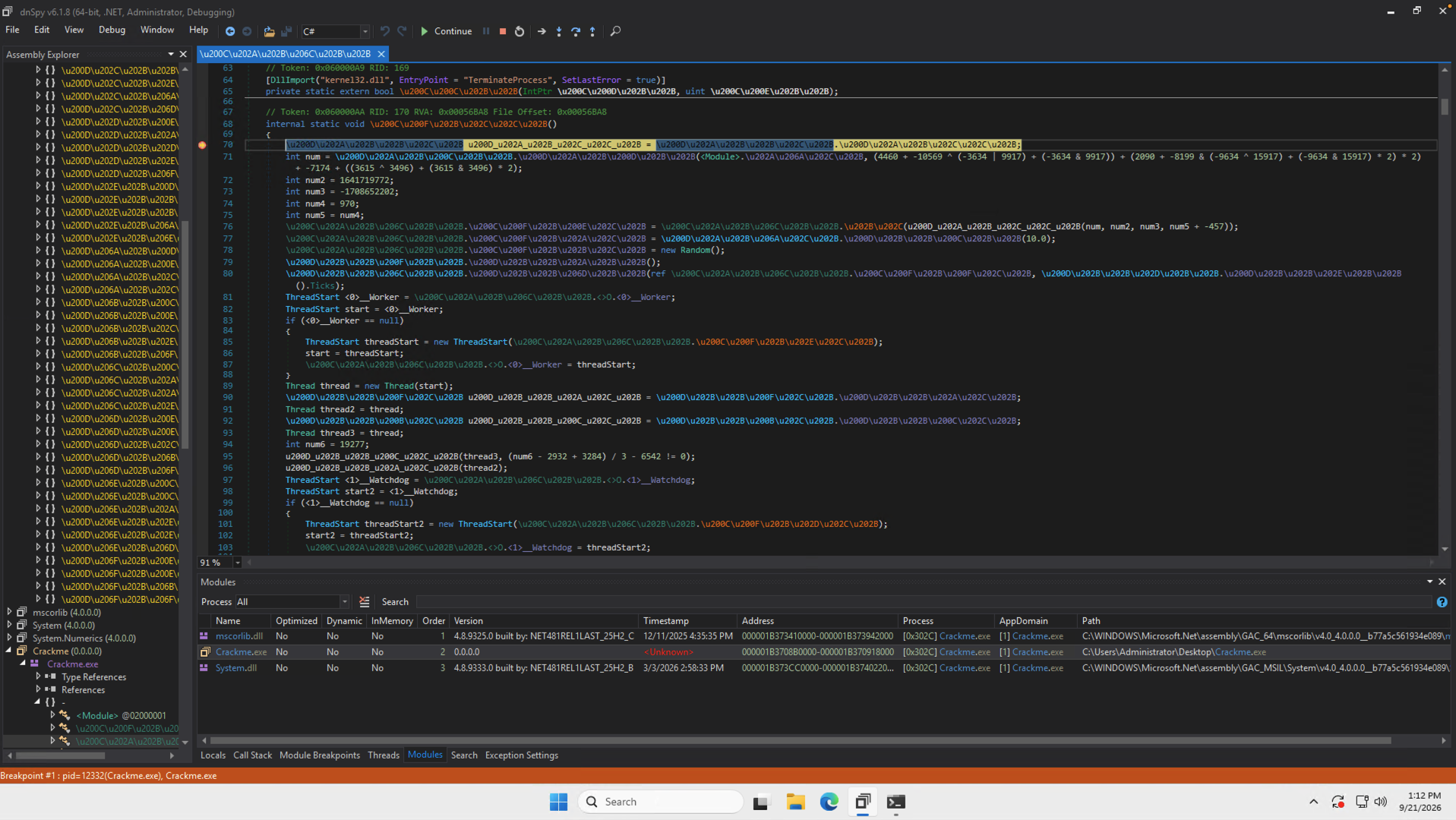
This method returns void. For this run, skip its body by moving directly to its return instruction.
Change the language dropdown to IL. If the view loses your place, jump to 0x060000AA again. Scroll to the end of that method and find IL_0215: ret.
Right-click the instruction and choose Set Next Statement. Check that the yellow arrow moves to ret.
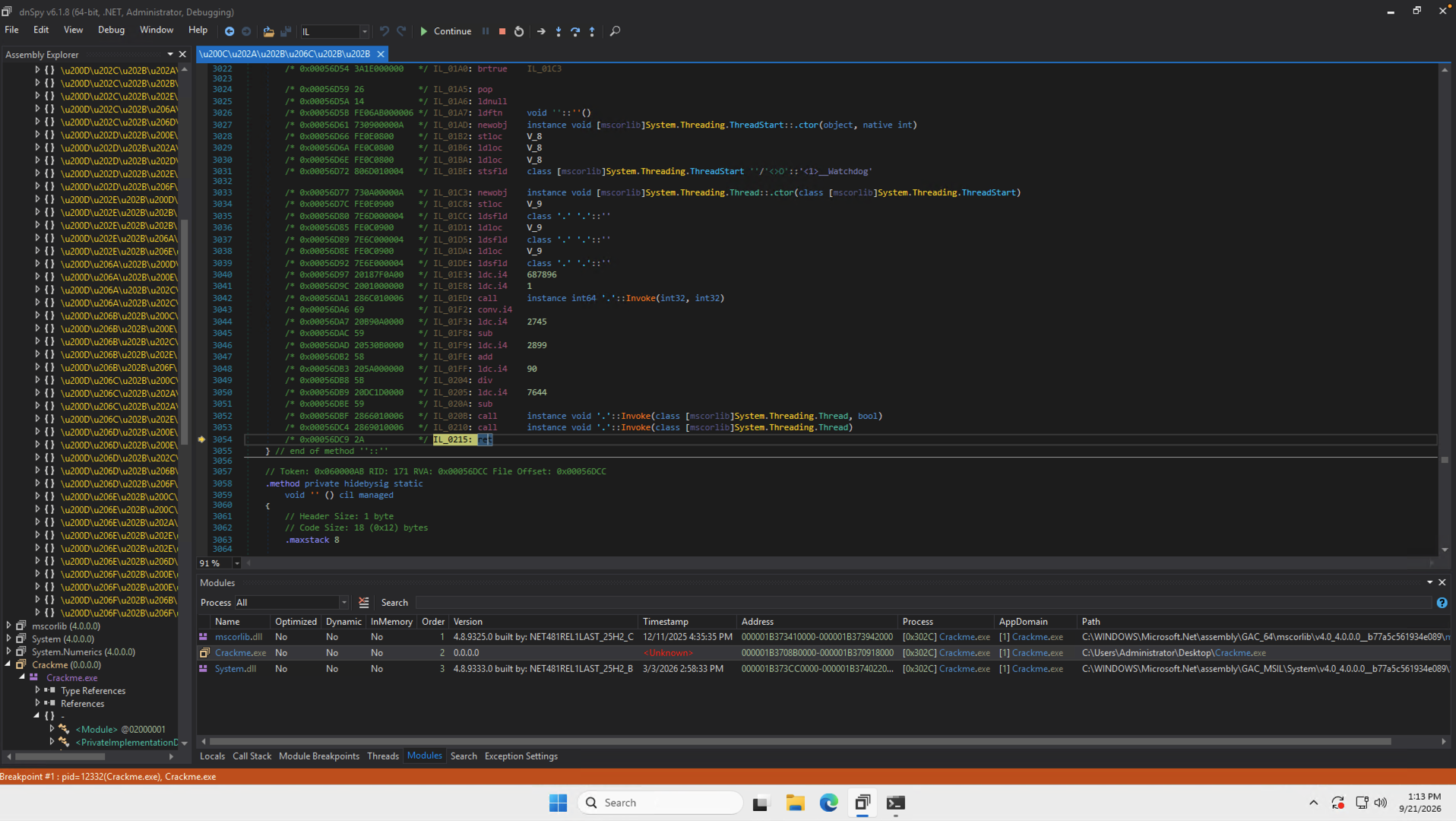
Don't use Run to Cursor here: that would execute everything between the current position and the return. Set Next Statement moves the execution position without running those instructions.
Leave the process paused on ret while setting up the next breakpoint. This only changes the current debugging session; there is nothing to save to the EXE.
The string is in args[1]
Switch back to C# and jump to 0x06000435. This callback takes an object[], casts the first element to a state object, and stores the second element as a string field.
Stripped of the unreadable names, its operation is:
static object StoreExpectedSerial(object[] args){ var state = (ValidationState)args[0]; state.ExpectedSerial = (string)args[1]; return null;}These names are just labels for the explanation. What matters in the real code is the assignment from (string)args[1].
By the time this method is entered, the VM has already calculated the string. Put a breakpoint on the first statement with F9, then press F5. The pending ret executes, startup continues, and the debugger stops in the callback.
Open Debug → Windows → Locals. Expand args, then look at element [1].
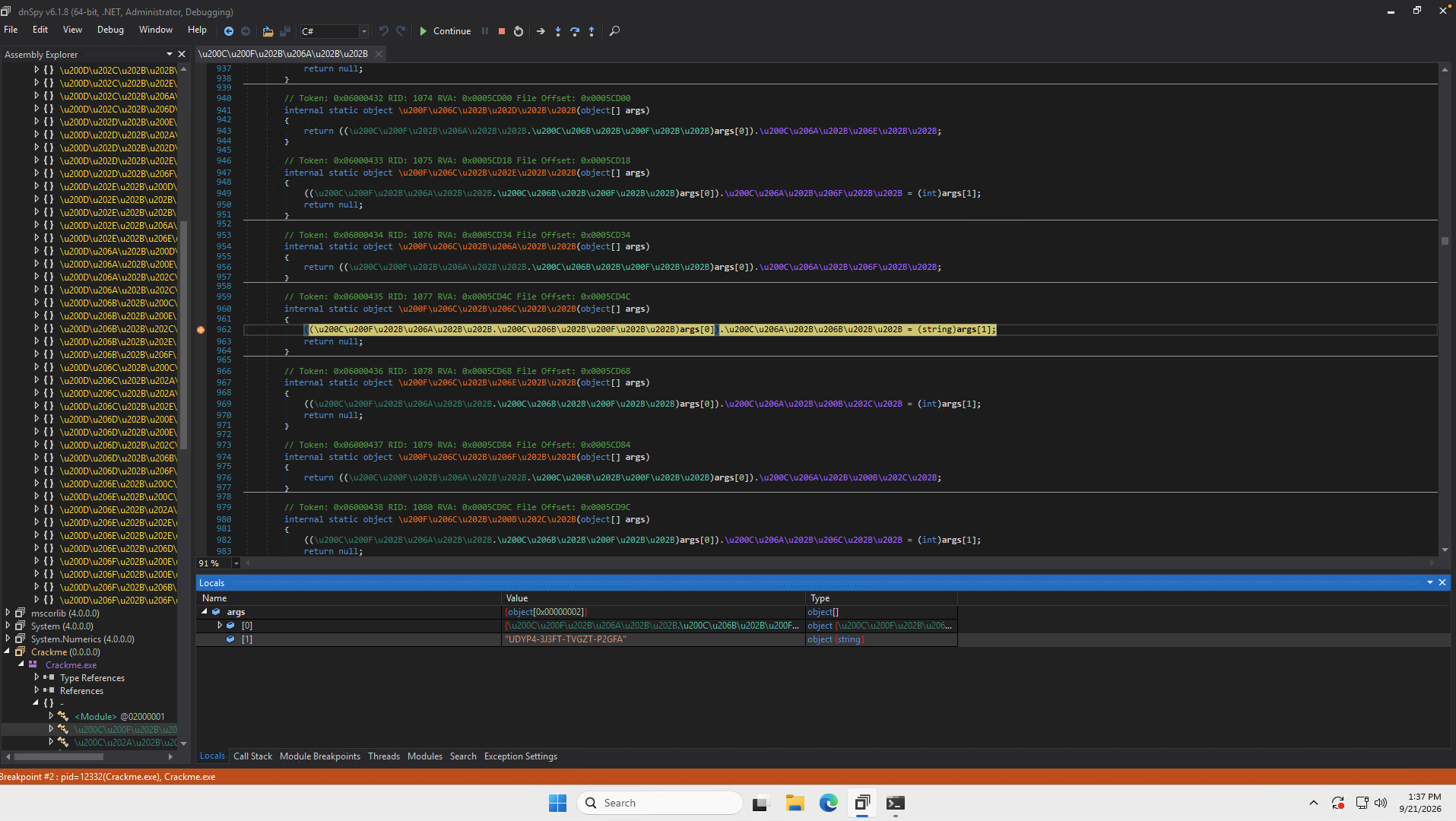
For test, the result is:
UDYP4-3J3FT-TVGZT-P2GFAThat's the program's calculated value, not the AAAAA-… input passed at launch. Copy it before stopping the debugger.
If this breakpoint doesn't trigger, first check the launch arguments. The dummy serial must survive the early length check. Also check that the breakpoint was placed in the memory-backed module, not its encrypted disk copy.
Try it without the debugger
Press Shift+F5 to stop the session and close dnSpy. Open PowerShell and run the original file with the recovered pair:
& "$env:USERPROFILE\Desktop\Crackme.exe" "test" "UDYP4-3J3FT-TVGZT-P2GFA"Change the path if your EXE is elsewhere. The & tells PowerShell to execute the quoted path; the next two arguments are the username and serial.

The license check accepts the pair. No success branch was forced and no modified assembly was saved.
The flag underneath is still unreadable. This gets a valid license pair; it doesn't recover the intended flag.
A note on the VM
The VM looks like a stack-based interpreter with shuffled opcode tables and managed callback adapters. The surrounding protection adds encrypted method bodies, indirect calls, arithmetic noise, and flattened control flow.
For this route, the useful weakness is specific: the checker builds a complete expected serial and passes it into a managed callback. The calculation stays protected, but its result is available to the debugger as a normal string.
That’s enough to satisfy the license check. Full devirtualization—and the readable flag—are separate problems. A follow-up write-up may cover devirtualizing the ILSentinel VM and recovering the logic behind these wrappers.
Sample
All tokens and offsets above refer to the original Crackme.exe with this SHA-256:
9fa59a8af9623eb3a4946d5a014ec5d027a406bef0aaa4cdcb44c2f313098ff7